Overview
One of the most powerful features of the emWave Pro software is the ability to revisit a past session and watch the real-time interaction between your emotions and your heart rhythm variability (HRV). This post-session analysis is a vital part of the “emotional muscle building” process.
How to Review a Session
- Enter Progress View: Click the Review Progress button on the main toolbar.
- Locate the Session: Use your cursor to highlight a specific entry in your session history list.
- Open Session Details: Double-click the highlighted session to transition into the Session View. Here, you can see the full graph of your HRV, your power spectrum average, and your final coherence ratios.
Using the Replay Feature
Replaying a session allows you to observe the exact moment your coherence levels shifted.
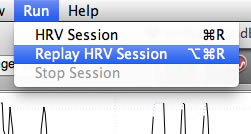
- Initiate Replay: Go to the top Run menu and select Replay HRV Session.
- Visual Experience: The software will animate the HRV graph and coherence indicators from the beginning of the recording to the end.
- Contextual Data: The replay will always honor the Challenge Level used when the data was first captured. You can check this level in the Session Information panel (click the magnifying glass icon if the panel is not visible).
Why Replay Matters
- Identify Emotional Triggers: Watch for the exact moments where your coherence dropped (moved from Green/Blue to Red). Can you remember what you were thinking or feeling at that second?
- Verify Breathing Patterns: Observe how long it took for your heart rhythm to stabilize after you started your rhythmic breathing.
- Adding Context: While in the replay or review mode, you can add Annotations or Journal entries to document your findings.
NOTE: Sessions will always replay with the same challenge level as they were originally recorded in. This data is available in the Session Information panel. If this panel is not visible, click the magnifying glass icon in the upper-right to toggle open the panel.