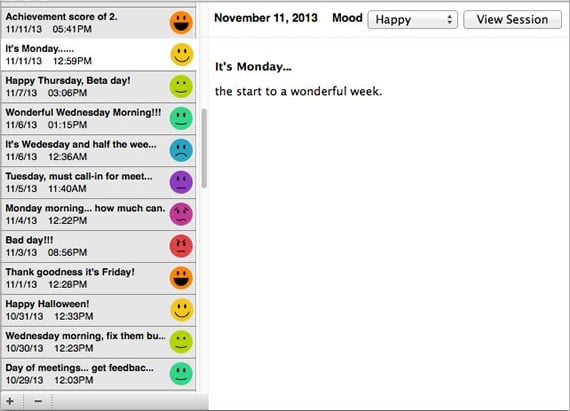
Record your daily thoughts and feelings during your training with your personal training journal.
Overview
The personal training journal is an essential tool for “emotional muscle building.” By recording your mental and emotional state before or after a session, you can identify patterns between your daily life and your physiological coherence levels.
Core Journal Management
- Accessing the View: Click the Journal icon in the main toolbar.
- Hotkeys: CTRL + J (PC) or Command + J (Mac).
- Adding Entries: Click the (+) sign in the lower-left corner.
- Editing: Select an existing entry to make text changes or select a different mood emoticon in the right-side panel.
- Deleting: Highlight the entry and click the (-) sign in the lower-left corner.
- Saving: Click the red X at the top of the journal window to save your work and close the view.
Journaling During an Active Session
You can capture insights the moment they happen without stopping your practice:
- While a session is running, click the Create Journal button on the right side panel.
- A text area will appear; click inside to type.
- Select a Mood emoticon that reflects your current state.
- Click the red X to minimize the journal and continue your session. Tip: If you find typing distracting, you may prefer to wait until the session is finished to record your thoughts, allowing you to stay focused on heart-focused breathing.
Linking Journals to Past Sessions
If you forgot to write a note during your practice, you can add one later:
- Go to the Review Progress view.
- Click on the specific session you want to annotate.
- Click the Create Journal button in the right-side panel.
- Enter your notes and select the appropriate mood emoticon for that day.
Syncing with HeartCloud
One of the primary benefits of using emWave Journals is the seamless integration with HeartCloud. Any entry you make in emWave Pro will automatically appear in your Inner Balance app history and vice-versa, providing a unified record of your growth across all HeartMath platforms.