If you are upgrading to an iPhone 15 or a newer iPad with a USB-C port, you can still use your wired Inner Balance Lightning Sensor. To ensure a successful connection, please follow the compatibility requirements and setup steps below.
iPhone 15 & USB-C Compatibility Guide
To use a Lightning-based sensor with a USB-C device, a specific adapter and software version are required to ensure the data from the sensor is read correctly.
Hardware & Software Requirements
- The Required Adapter: You must use the official Apple USB-C to Lightning Adapter.
- Purchase Link: Apple USB-C to Lightning Adapter
- Note: HeartMath testing indicates that third-party adapters generally do not support the data connection required for the PulsePod sensor.
- Operating System: Your iPhone 15 or iPad must be running iOS/iPadOS 17.4.1 or later.
II. Connection Steps
- Plug in the Hardware: Connect your Inner Balance Lightning Sensor to the Apple USB-C to Lightning Adapter, then plug the adapter into your phone or tablet.
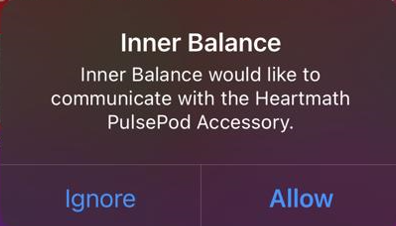
- Grant Permission: A pop-up message will appear on your screen:“Inner Balance would like to communicate with the HeartMath PulsePod Accessory”
- Finalize: Tap Allow. The Inner Balance app will automatically recognize the sensor, allowing you to begin your session.
Troubleshooting Tips
- No Pop-up? If the message does not appear, try unplugging the adapter from the phone, flipping the USB-C connector 180 degrees, and plugging it back in.
- Software Updates: If you are on an older version of iOS 17, the adapter may not be recognized. Please update your device via Settings > General > Software Update.
- Adapter Firmware: If the connection is still not established, connecting the adapter to a Mac for a few minutes can sometimes trigger a necessary background firmware update for the adapter itself.
One Comment “iPhone 15, 16 and 17 Lightning Sensor Adapter Information”
Comments are closed.