Overview
The Inner Balance app allows you to integrate your own music into your coherence training. Using music that you find calming or uplifting can make it easier to enter a state of High Coherence. Additionally, many users use the length of a specific song as a guide for their total practice time.
Step-by-Step Instructions
-
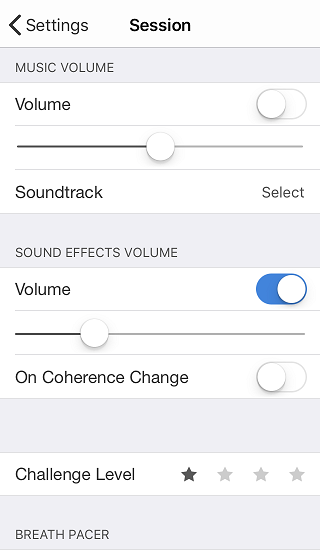
Open Settings: Launch the Inner Balance app and tap the Settings icon in the upper left corner.
-
Access Soundtrack Options: Scroll to the Sessions section and look for the Soundtrack field. Tap Select.
-
Choose Your Music: Your device’s local music library will open. Select a song that helps you feel calm and focused.
-
Tip: A song around 5 minutes in length is often ideal for a standard practice session.
-
-
Confirm Selection: Tap Done to return to the Settings screen.
-
Adjust Audio Levels: Use the volume slider in the app to set your music level.
-
Note: You can also use the physical volume buttons on the side of your phone.
-
Managing Coherence Tones vs. Music
The app features “Sound Effects” (coherence tones) that chime to let you know your coherence level. You can choose how these interact with your music:
-
To hear both: Ensure the Sound Effects Volume is turned up.
-
To hear music only: Set the Sound Effects Volume to Off.
-
Quick Mute: You can also toggle the Soundtrack on or off instantly by tapping the Speaker Icon on the main session screen.
Special Features
-
My Inspiration: Your selected soundtrack will continue to play even if you use the My Inspiration video feature during your session.
-
Session Timing: Because the music stops when the file ends, it provides a gentle, non-intrusive way to know when you have completed your intended practice time.